Producing compelling visual stories no longer demands physical studio spaces, camera rigs, or on-screen talent. As detailed in an operational breakdown by Willeder Inc. on note, creators can execute a complete zero-filming video pipeline by pairing conversational large language models with dedicated video generation platforms. By adopting a methodical AI video generation workflow using ChatGPT and Kling AI, independent creators and production teams can take an idea from structural outline to final assembly while circumventing standard physical filming hurdles.
Pre-Production: Structuring Your Video Before Generating
Before launching generative software, establishing a rigid structure is necessary. Jumping straight into prompting without a roadmap often leads to fragmented footage and unclear storytelling. Creators should begin by clarifying the core purpose of their project. Whether the goal is a product introduction, a paid social media advertisement, or a recruitment PR video, the underlying objective dictates pacing, framing, and tone.
Distribution requirements also determine your visual constraints from the outset. Horizontal delivery for YouTube calls for a standard 16:9 layout, whereas vertical feeds on platforms like Instagram and TikTok require vertical formatting. Planning these dimensions early avoids problematic reframing later in the editorial process.
To keep asset creation manageable, establish the total runtime and map out the exact scene count. For example, a 30-second commercial can be neatly divided into six five-second scenes. When facing creative friction during this phase, creators can lean on ChatGPT to generate structural proposals. Asking the model to outline a scene-by-scene breakdown for a specific video length provides an immediate working draft, significantly cutting down early planning time.
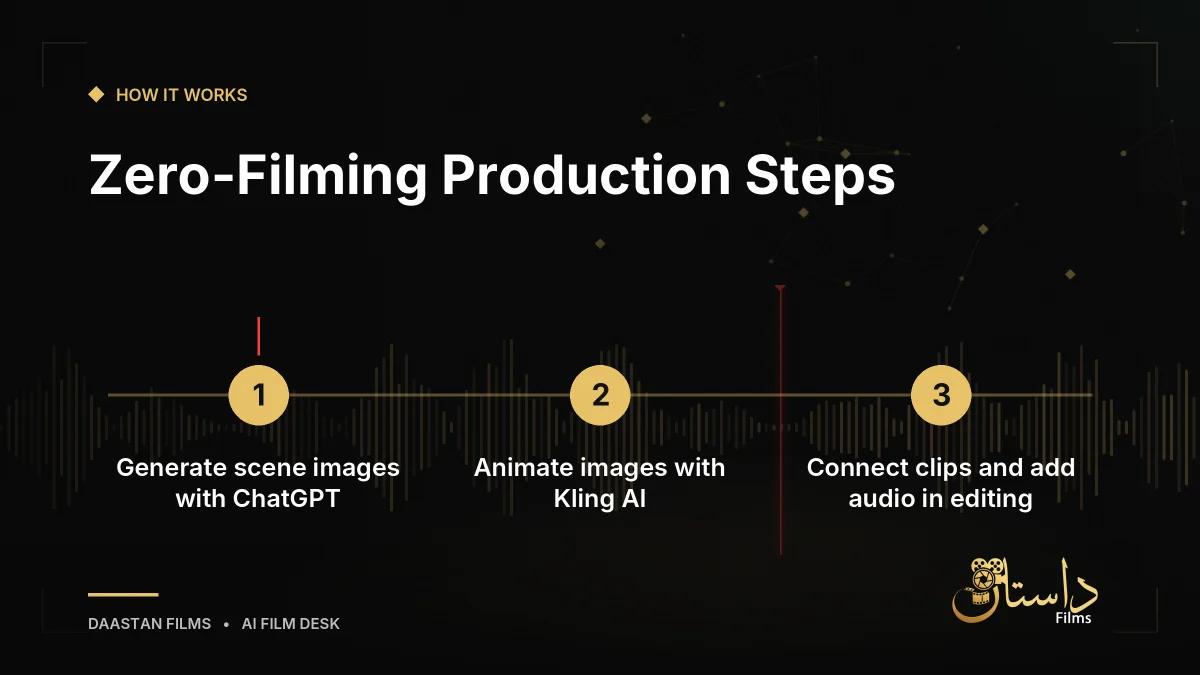
Step 1: Solidifying First-Frame Anchor Images in ChatGPT
The foundational stage of this production model relies on generating static keyframes for each cut using ChatGPT. Rather than asking a video platform to synthesize video entirely from text descriptions, generating the first frame as an image first delivers substantial quality control. Direct text-to-video pipelines frequently suffer from continuity drift, causing facial structures, costumes, and environmental tones to shift erratically between shots. Anchoring each cut to a predefined static image ensures that the subject and mood remain steady before any motion is applied.
When generating these initial frames, prompt specificity is essential. A vague concept will yield unpredictable results, whereas detailing the setting, subjects, actions, lighting, atmosphere, and aspect ratio locks in the desired aesthetic. For instance, prompting an image of a grandfather and grandchild talking in a park under soft natural light with a movie-like atmosphere in a 16:9 horizontal format provides clear parameters for the system to interpret.
Another practical benefit of this conversational approach is iterative refinement. If an initial image misses the mark, creators can instruct ChatGPT to alter the framing directly within the chat dialogue, requesting a wider camera angle or a blurred background. To preserve stylistic uniformity across every cut, consider these practices:
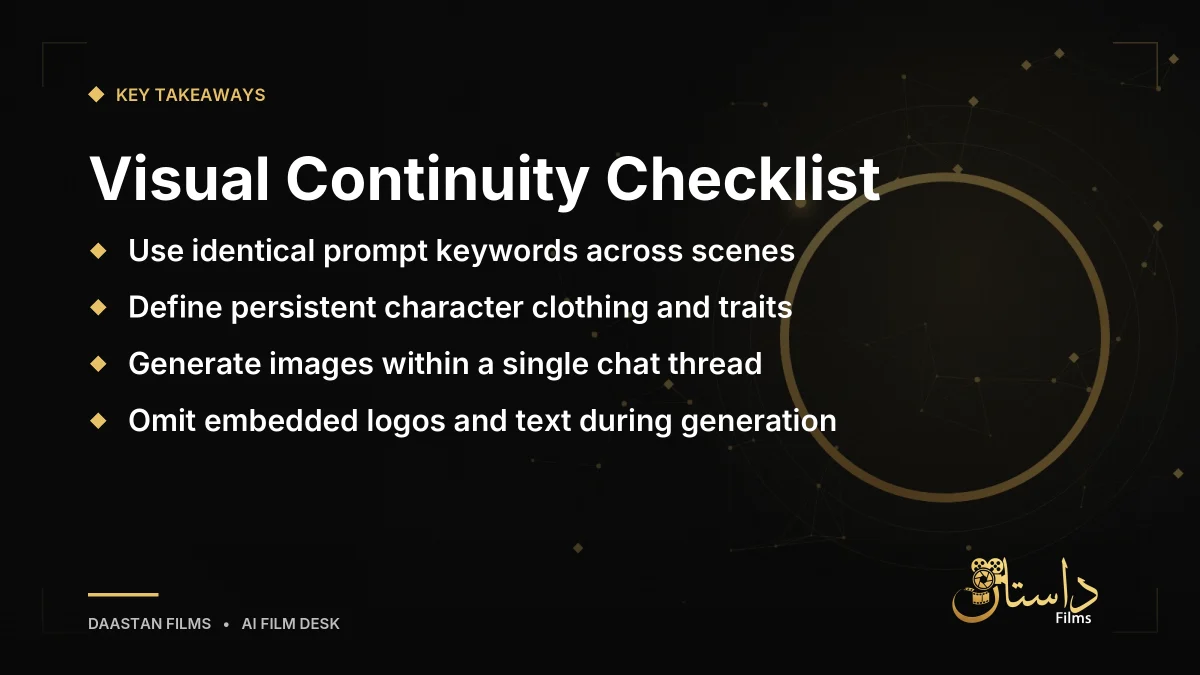
- Consistent Terminology: Reuse identical stylistic keywords across all image prompts, such as cinematic, photorealistic, warm tones, and 16:9.
- Locked Character Profiles: Explicitly define persistent physical traits, such as a woman in her 20s with short black hair wearing a white shirt and beige apron.
- Single Chat Threads: Keep the entire scene generation process within one conversation thread, directing the AI to carry over the exact person from the preceding frame.
During this stage, deliberately omit graphic elements, logos, and typography from the generated images. AI video generators frequently warp static text and logos into illegible artifacts during motion synthesis, making it far safer to introduce titles cleanly during final post-production.
Step 2: Animating Keyframes with Kling AI
Once your storyboard frames are generated, the next phase is bringing them to life inside Kling AI. Within the platform, creators upload their selected anchor images and input motion prompts describing exactly how elements within the frame should move. Here, you configure duration settings, image quality preferences, and target aspect ratios.
Achieving believable movement requires creative restraint. Attempting to force too many complex actions into a single cut—such as an actor running, turning around, and waving—inevitably leads to distorted body parts and unnatural gestures. Restricting movement instructions to one or two discrete actions per cut, such as a woman and a man talking while the camera slowly zooms in, produces much more natural and convincing movement.
Resource management is another critical consideration during animation. Kling AI functions on a credit system, meaning high-resolution generations will rapidly deplete available credits. A sensible production strategy is to test motion behavior first using shorter, five-second clips at lower quality settings. Once a test demonstrates stable, pleasing motion, recreate that specific take in high quality for your final edit.
Step 3: Assembly and Post-Production Editorial
The final phase takes place inside standard video editing software, such as CapCut, Adobe Premiere Pro, or DaVinci Resolve. The generated clips serve as your raw footage, which must be sequenced according to your original storyboard. Adjust the timing of each cut to support narrative pacing and maintain viewer engagement.
Scene transitions should be handled with care. Inserting short fades between clips can smooth out abrupt shifts, but overusing flashy transitions can undermine the perceived production value. Audio design plays an equally decisive role in elevating the material. Layering background music, complementary sound effects, and clean voiceover narration bridges individual clips and grounds the visuals.
Finally, utilize your editing suite's title tools to overlay branding, product names, and taglines. Handling text as an editorial layer ensures crisp, legible graphics that remain free from generative video distortion.
Practical Limitations, Quality Risks, and Legal Cautions
While an AI video generation workflow bypasses traditional set logistics, creators must navigate specific operational constraints:
- Licensing and Commercial Usage: Kling AI applies visible watermarks to content generated on free accounts and restricts free outputs from being used commercially. Any project destined for corporate public relations, commercial advertising, or monetized campaigns requires a paid subscription tier. Platform terms can evolve, so reviewing current guidelines prior to deployment is essential.
- Generative Variability: Submitting identical source images and text instructions will not yield identical visual results every time. Production planning must account for generating multiple variations for each scene and curating the most natural take.
- Motion and Structural Artifacts: Generative models continue to struggle with intricate anatomical details, particularly fine finger movements, as well as on-screen text. Filmmakers should frame compositions to minimize difficult micro-movements whenever possible.
- Intellectual Property and Privacy: Utilizing the likenesses of real celebrities, existing corporate trademarks, or copyrighted characters introduces severe legal liabilities. Furthermore, creators must never feed sensitive corporate information or private personal data into generative tools.
Approaching zero-filming video creation with realistic expectations and strict pre-production discipline enables filmmakers to turn generative models into reliable production tools.
Frequently asked questions
Generating images first creates an anchor frame that locks in character appearance, lighting, and environment. Text-to-video directly often causes character faces and visual tone to change inconsistently across cuts.
No, Kling AI applies a watermark to outputs created under the free plan and restricts them from commercial use. Commercial advertising and corporate PR require an active paid plan.
Limit your motion prompt to one or two simple movements per cut, such as a subtle camera zoom or a quiet conversation. Cramming multiple actions like running and waving into a single generation often causes distorted limbs.
Have a film, DVC or AI project in mind?
Daastan Films blends production, post-production and AI. Let’s talk about yours.